
Quick answer: Enter the acquisition facts and separate land from the property amount being modeled for depreciation. A planning land percentage needs support before filing.
Before you begin #
Gather your closing statement, acquisition costs, and records supporting the land allocation.
Steps #
- Open the basis section and enter the purchase amount requested.
- Enter the land amount or allocation using your records. If you are using a temporary planning value, identify it as provisional.
- Review the displayed property basis and confirm that land has been excluded from the depreciable portion.
- Save the section and preserve the documents and explanation supporting your inputs.
See this stage in the current demo #
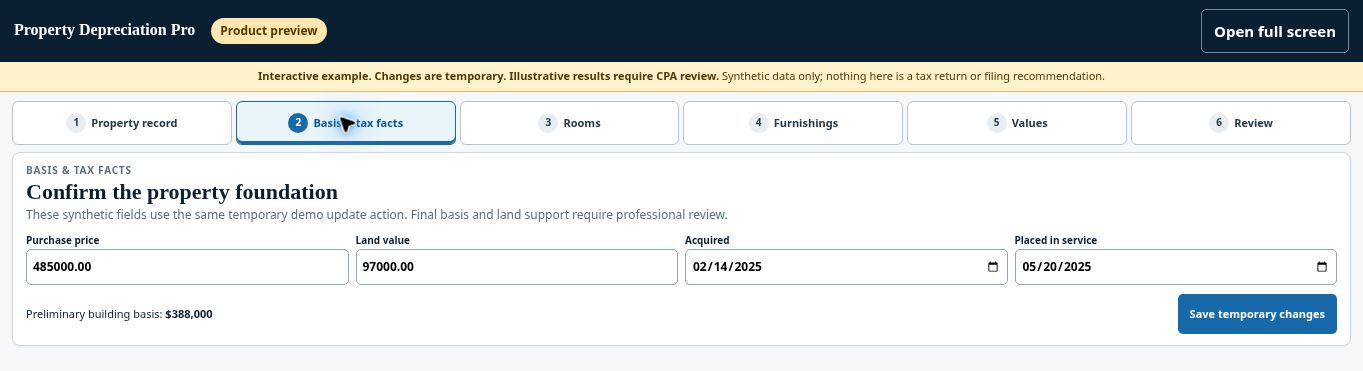
Try the Basis & tax facts demo →
Check before continuing #
Check for duplicate costs, missing acquisition facts, and an unsupported land allocation. Your CPA reviews the final tax basis.
If you get stuck #
A default or suggested percentage is not proof of the correct land value. Do not treat the illustrative 20% shown in a screenshot as a universal rule.
Related help #
Open Property Depreciation Pro and select the relevant property. View the product tour.
This guide explains software use. Your CPA independently reviews classification, tax treatment, elections, and whether deductions are available or usable for your circumstances.


